Logitech Wireless Mouse M220 SILENT - Red

Description

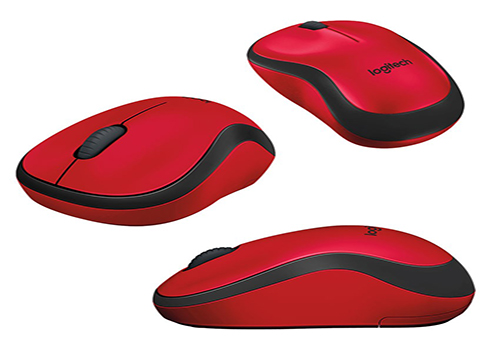
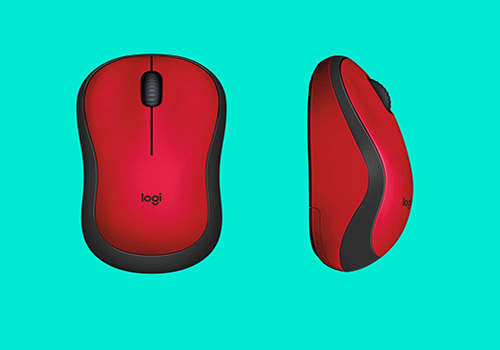
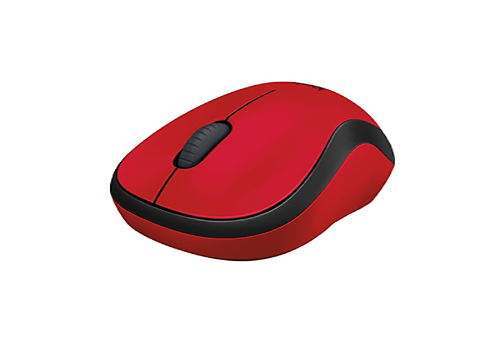
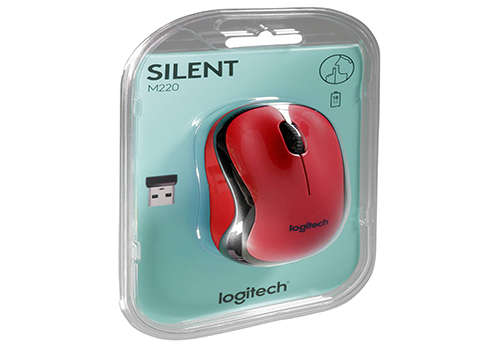
Logitech Wireless Mouse M220 SILENT - Red

Silence In Every Click

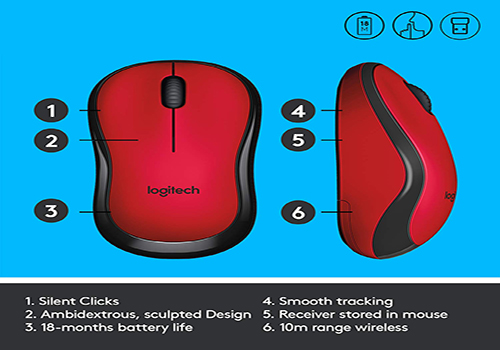
Forget About Distracting Clicking Sounds. M220 Reduces Over 90% Sound Level. Left Click Dba Measured By An Independent Lab At 1m. Of Noise, Creating A Quieter And More Productive Environment For You And Those Around You. The Small Size And Smooth Cursor Control Make It Great For Tight Workspaces And Busy Desks.

Less Noise, More Focus

Stay Focused On Your Work Without Noise Distractions. Logitech’s Own Silenttouch Technology Reduces Over 90% 2sound Level Comparison Between Logitech M220 And Logitech M170. Left Click Dba Measured By An Independent Lab At 1m. Of Clicking Sounds, All While Ensuring The Mouse Performs Its Best. That Means You Can Feel Every Single Click But Hear Virtually Nothing.

Comfortable Shape, Compact Design

Stay Productive Longer With The Comfortable, Contoured Shape That Follows The Natural Curve Of Your Hand. Compact And Wireless, The Mouse Fits Easily With Your Laptop In A Bag—So You Can Take It Anywhere You Work. M220 Is Designed To Be Equally Comfortable For Both Left- And Right-Handed Users.

Easy Navigation, Precise Control

Navigate Easier With A Controlled Line-By-Line Scrolling Experience. No More Annoying Missed Clicks—The Optical Sensor Allows You To Track With Smooth And Accurate Cursor Control On Almost Any Surface.

Quality You Can Rely On

M220 Works Up To 18 Months 4battery Life May Vary Based On Use And Computing Conditions. Without Changing Batteries Thanks To The On/Off Switch Button And Auto-Sleep Power-Saving Mode.

Plug & Play Simplicity

M220 Is Compatible With Windows®, Macos, Chrome Os™ And Linux® And Works Instantly When You Plug The Usb Receiver Into Your Computer Or Laptop. The Receiver Also Provides A Strong, Reliable Connection Within Up To 10 Meters5wireless Range May Vary Based On User, Environmental And Computing Conditions.

Increased Productivity

Get More Done By Adding M220 To Your Laptop. According To A Recent Study, Laptop Users Who Chose This Mouse Over A Touchpad Were 50% More Productive based On Throughput Computation In Bits/Second Combining Speed And Accuracy Averaged For All Devices Participating In The Study. Logitech Ergonomic Lab Study On 23 Participants In (Oct / 2019) With Two Logitech Standard Mice And Two Standard, Embedded Trackpads And Worked 30% Faster

Specifications:

Product Dimensions

1.54 x 3.9 x 2.36 inches

Item Weight

3.17 ounces

Item model number

910-004880

Batteries

1 AA batteries required. (included)

Brand

Logitech

Color

Red

Product Type

Mouse

Logitech Wireless Mouse M220 SILENT - Red

Product form

5.500 KD

    • Guaranteed secure & safe checkout.

    Description

    Logitech Wireless Mouse M220 SILENT - Red

    Silence In Every Click

    Forget About Distracting Clicking Sounds. M220 Reduces Over 90% Sound Level. Left Click Dba Measured By An Independent Lab At 1m. Of Noise, Creating A Quieter And More Productive Environment For You And Those Around You. The Small Size And Smooth Cursor Control Make It Great For Tight Workspaces And Busy Desks.

    Less Noise, More Focus

    Stay Focused On Your Work Without Noise Distractions. Logitech’s Own Silenttouch Technology Reduces Over 90% 2sound Level Comparison Between Logitech M220 And Logitech M170. Left Click Dba Measured By An Independent Lab At 1m. Of Clicking Sounds, All While Ensuring The Mouse Performs Its Best. That Means You Can Feel Every Single Click But Hear Virtually Nothing.

    Comfortable Shape, Compact Design

    Stay Productive Longer With The Comfortable, Contoured Shape That Follows The Natural Curve Of Your Hand. Compact And Wireless, The Mouse Fits Easily With Your Laptop In A Bag—So You Can Take It Anywhere You Work. M220 Is Designed To Be Equally Comfortable For Both Left- And Right-Handed Users.

    Easy Navigation, Precise Control

    Navigate Easier With A Controlled Line-By-Line Scrolling Experience. No More Annoying Missed Clicks—The Optical Sensor Allows You To Track With Smooth And Accurate Cursor Control On Almost Any Surface.

    Quality You Can Rely On

    M220 Works Up To 18 Months 4battery Life May Vary Based On Use And Computing Conditions. Without Changing Batteries Thanks To The On/Off Switch Button And Auto-Sleep Power-Saving Mode.

    Plug & Play Simplicity

    M220 Is Compatible With Windows®, Macos, Chrome Os™ And Linux® And Works Instantly When You Plug The Usb Receiver Into Your Computer Or Laptop. The Receiver Also Provides A Strong, Reliable Connection Within Up To 10 Meters5wireless Range May Vary Based On User, Environmental And Computing Conditions.

    Increased Productivity

    Get More Done By Adding M220 To Your Laptop. According To A Recent Study, Laptop Users Who Chose This Mouse Over A Touchpad Were 50% More Productive based On Throughput Computation In Bits/Second Combining Speed And Accuracy Averaged For All Devices Participating In The Study. Logitech Ergonomic Lab Study On 23 Participants In (Oct / 2019) With Two Logitech Standard Mice And Two Standard, Embedded Trackpads And Worked 30% Faster

    Specifications:

    Product Dimensions

    1.54 x 3.9 x 2.36 inches

    Item Weight

    3.17 ounces

    Item model number

    910-004880

    Batteries

    1 AA batteries required. (included)

    Brand

    Logitech

    Color

    Red

    Product Type

    Mouse

    Returns & Delivery

    When will my order be delivered?

    We ship worldwide. Your order will be packaged really carefully and delivered wherever you want. Delivery takes between 2-4 business days. You will receive an e-mail after ordering with more information about the delivery.

    Can I return my product?

    Orders can be returned or exchanged within 30 days of receiving the parcel, providing they are in original resalable condition.

    What can I do if my item (or part of it) is damaged?

    We work hard to deliver your items without damage. Orders can be returned or exchanged within 30 days of receiving the parcel, providing they are in original resalable condition.

    Recently viewed products

      Footer image

      © 2026 TechTide

          Login

          Forgot your password?

          Don't have an account yet?
          Create account